

Scenario Description
JumpServer provides API documentation through Swagger, allowing users to perform secondary development on the platform via API interfaces. This article introduces various API authentication methods in JumpServer.
Operation Instructions
The API documentation is integrated into the code by default and can be accessed via the URL after deployment.
API Access
| JumpServer Version | Access method | example |
|---|---|---|
| >=4.0.0 | http://{JumpServer_URL}/api/docs/ | http://192.168.244.144/api/docs/ |
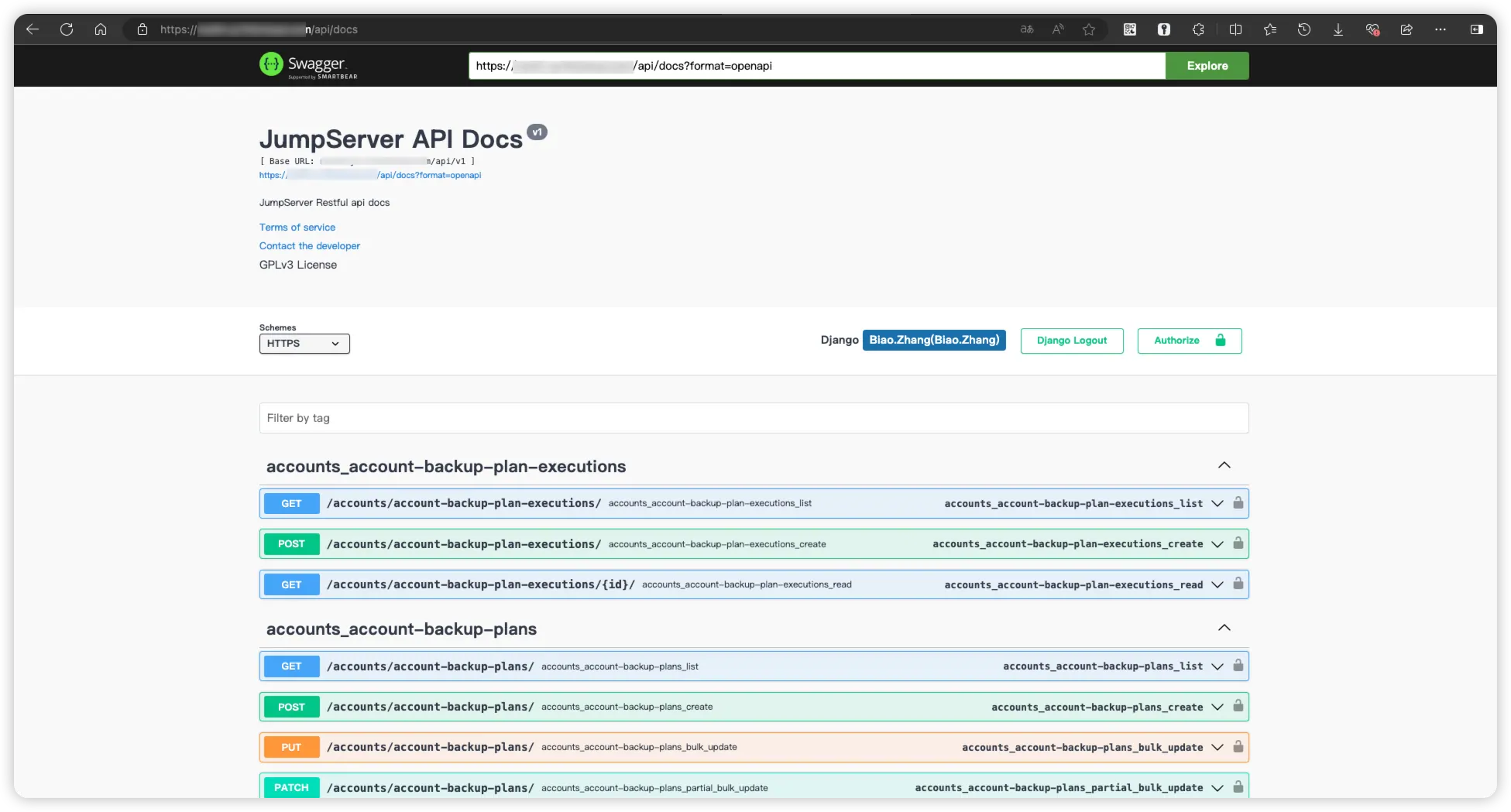
API Authentication
JumpServer supports the following authentication methods:
| Authentication Type | Description |
|---|---|
| Session | After logging in, you can directly use the as an authentication method. |
| Token | Obtain a one-time token, which has an expiration period and becomes invalid after expiration. |
| Private Token | Permanent token. |
| Access Key | Sign the HTTP header. |
Session
After the user logs in to the JumpServer page, the
Token
Curl Example
## Curl Example
curl -X POST http://localhost/api/v1/authentication/auth/ \
     -H 'Content-Type: application/json' \
     -d '{"username": "admin", "password": "admin"}'
Python Example
## Python Example
## pip install requests
import requests, json

def get_token(jms_url, username, password):
    url = jms_url + '/api/v1/authentication/auth/'
    query_args = {
        "username": username,
        "password": password
    }
    response = requests.post(url, data=query_args)
    return json.loads(response.text)['token']

def get_user_info(jms_url, token):
    url = jms_url + '/api/v1/users/users/'
    headers = {
        "Authorization": 'Bearer ' + token,
        'X-JMS-ORG': '00000000-0000-0000-0000-000000000002'
    }
    response = requests.get(url, headers=headers)
    print(json.loads(response.text))

if __name__ == '__main__':
    jms_url = 'https://demo.jumpserver.org'
    username = 'admin'
    password = 'admin'
    token = get_token(jms_url, username, password)
    get_user_info(jms_url, token)
Golang Example
// Golang Example
package main

import (
    "encoding/json"
    "fmt"
    "io/ioutil"
    "log"
    "net/http"
    "strings"
)

const (
    JmsServerURL = "https://demo.jumpserver.org"
    UserName = "admin"
    Password = "password"
)

func GetToken(jmsurl, username, password string) (string, error) {
    url := jmsurl + "/api/v1/authentication/auth/"
    query_args := strings.NewReader(`{
        "username": "`+username+`",
        "password": "`+password+`"
    }`)
    client := &http.Client{}
    req, err := http.NewRequest("POST", url, query_args)
    req.Header.Add("Content-Type", "application/json")
    resp, err := client.Do(req)
    if err != nil {
        log.Fatal(err)
    }
    defer resp.Body.Close()
    body, err := ioutil.ReadAll(resp.Body)
    if err != nil {
        log.Fatal(err)
    }
    response := map[string]interface{}{}
    json.Unmarshal(body, &response)
    return response["token"].(string), nil
}

func GetUserInfo(jmsurl, token string) {
    url := jmsurl + "/api/v1/users/users/"
    client := &http.Client{}
    req, err := http.NewRequest("GET", url, nil)
    req.Header.Add("Authorization", "Bearer "+token)
    req.Header.Add("X-JMS-ORG", "00000000-0000-0000-0000-000000000002")
    resp, err := client.Do(req)
    if err != nil {
        log.Fatal(err)
    }
    defer resp.Body.Close()
    body, err := ioutil.ReadAll(resp.Body)
    if err != nil {
        log.Fatal(err)
    }
    fmt.Println(string(body))
}

func main() {
    token, err := GetToken(JmsServerURL, UserName, Password)
    if err != nil {
        log.Fatal(err)
    }
    GetUserInfo(JmsServerURL, token)
}
Java Example
// Java Example
import com.alibaba.fastjson.JSONObject;
import org.apache.commons.lang3.StringUtils;

import javax.net.ssl.*;
import java.io.BufferedReader;
import java.io.IOException;
import java.io.InputStreamReader;
import java.io.OutputStream;
import java.net.URL;
import java.util.HashMap;
import java.util.Map;

public class HttpsClientTest {

    private static final String JMS_URL = "hhttps://demo.jumpserver.org";
    private static final String JS_USER = "admin";
    private static final String JS_PASSWORD = "admin";

    public static void main(String[] args) throws IOException {
        Map map = new HashMap();
        map.put("username", JS_USER);
        map.put("password", JS_PASSWORD);
        https(JSONObject.toJSONString(map), "", "/api/v1/authentication/auth/");
    }

    public static void https(String params, String token, String uri) throws IOException {

        // Create URL object
        URL obj = new URL(JMS_URL + uri);
        // Open connection
        HttpsURLConnection conn = (HttpsURLConnection) obj.openConnection();

        // Ignore certificate validation
        conn.setHostnameVerifier((hostname, session) -> true);
        conn.setSSLSocketFactory(getTrustedSSLSocketFactory());

        // Set request method
        conn.setRequestMethod("GET");

        // Set request headers
        conn.setRequestProperty("Content-Type", "application/json");
        conn.setRequestProperty("x-jms-org", "00000000-0000-0000-0000-000000000002");


        if (StringUtils.isNotBlank(token)) {
            conn.setRequestProperty("Authorization", "Bearer " + token);
        }

        // Set request body data
        conn.setDoOutput(true);
        if (StringUtils.isNotBlank(params)) {
            try (OutputStream outputStream = conn.getOutputStream()) {
                outputStream.write(params.getBytes("UTF-8"));
            }
        }
        // Send request and get response
        int responseCode = conn.getResponseCode();
        BufferedReader in = new BufferedReader(new InputStreamReader(conn.getInputStream()));
        String inputLine;
        StringBuilder response = new StringBuilder();
        while ((inputLine = in.readLine()) != null) {
            response.append(inputLine);
        }
        String res = response.toString();
        in.close();
    }

    private static SSLSocketFactory getTrustedSSLSocketFactory() {
        try {
            SSLContext sslContext = SSLContext.getInstance("TLS");
            sslContext.init(null, new TrustManager[] { new X509TrustManager() {
                @Override
                public void checkClientTrusted(java.security.cert.X509Certificate[] chain, String authType) {
                }

                @Override
                public void checkServerTrusted(java.security.cert.X509Certificate[] chain, String authType) {
                }

                @Override
                public java.security.cert.X509Certificate[] getAcceptedIssuers() {
                    return null;
                }
            } }, new java.security.SecureRandom());
            return sslContext.getSocketFactory();
        } catch (Exception e) {
            e.printStackTrace();
            return null;
        }
    }
}
Private Token
A Private Token needs to be generated on the JumpServer server.
Note: The existing private_token can be retrieved directly by executing the command <u.private_token>.
docker exec -it jms_core /bin/bash
cd /opt/jumpserver/apps
python manage.py shell
from users.models import User
u = User.objects.get(username='admin')
u.create_private_token()
Curl Example
## Curl Example
curl http://demo.jumpserver.org/api/v1/users/users/ \
     -H 'Authorization: Token 937b38011acf499eb474e2fecb424ab3' \
     -H 'Content-Type: application/json' \
     -H 'X-JMS-ORG: 00000000-0000-0000-0000-000000000002'
Python Example
## Python Example
## pip install requests
import requests, json

def get_user_info(jms_url, token):
    url = jms_url + '/api/v1/users/users/'
    headers = {
        "Authorization": 'Token ' + token,
        'X-JMS-ORG': '00000000-0000-0000-0000-000000000002'
    }
    response = requests.get(url, headers=headers)
    print(json.loads(response.text))

if __name__ == '__main__':
    jms_url = 'https://demo.jumpserver.org'
    token = '937b38011acf499eb474e2fecb424ab3'
    get_user_info(jms_url, token)
Golong Example
// Golang Example
package main

import (
    "encoding/json"
    "fmt"
    "io/ioutil"
    "log"
    "net/http"
    "strings"
)

const (
    JmsServerURL = "https://demo.jumpserver.org"
    JMSToken = "adminToken"
)

func GetUserInfo(jmsurl, token string) {
    url := jmsurl + "/api/v1/users/users/"
    client := &http.Client{}
    req, err := http.NewRequest("GET", url, nil)
    req.Header.Add("Authorization", "Token "+token)
    req.Header.Add("X-JMS-ORG", "00000000-0000-0000-0000-000000000002")
    resp, err := client.Do(req)
    if err != nil {
        log.Fatal(err)
    }
    defer resp.Body.Close()
    body, err := ioutil.ReadAll(resp.Body)
    if err != nil {
        log.Fatal(err)
    }
    fmt.Println(string(body))
}

func main() {
    GetUserInfo(JmsServerURL, JMSToken)
}
Access Key
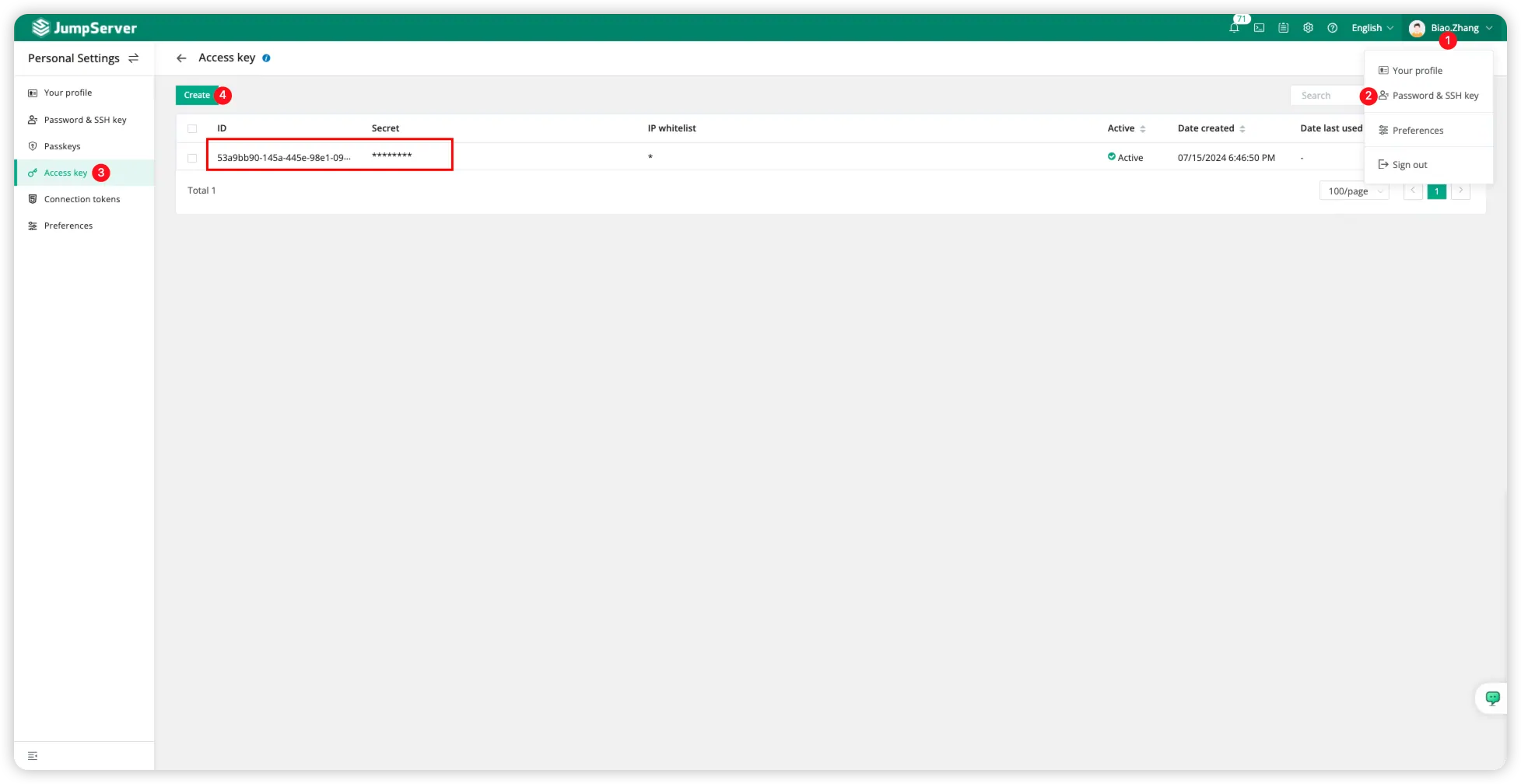
Switch to the JumpServer user's
Note: Please securely save the generated
Python Example
## Python Example
## pip install requests drf-httpsig
import requests, datetime, json
from httpsig.requests_auth import HTTPSignatureAuth

def get_auth(KeyID, SecretID):
    signature_headers = ['(request-target)', 'accept', 'date']
    auth = HTTPSignatureAuth(key_id=KeyID, secret=SecretID, algorithm='hmac-sha256', headers=signature_headers)
    return auth

def get_user_info(jms_url, auth):
    url = jms_url + '/api/v1/users/users/'
    gmt_form = '%a, %d %b %Y %H:%M:%S GMT'
    headers = {
        'Accept': 'application/json',
        'X-JMS-ORG': '00000000-0000-0000-0000-000000000002',
        'Date': datetime.datetime.utcnow().strftime(gmt_form)
    }

    response = requests.get(url, auth=auth, headers=headers)
    print(json.loads(response.text))

if __name__ == '__main__':
    jms_url = 'https://demo.jumpserver.org'
    KeyID = 'AccessKeyID'
    SecretID = 'AccessKeySecret'
    auth = get_auth(KeyID, SecretID)
    get_user_info(jms_url, auth)
Golong Example
// Golang Example
package main

import (
    "fmt"
    "io/ioutil"
    "log"
    "net/http"
    "time"
    "gopkg.in/twindagger/httpsig.v1"
)

const (
    JmsServerURL = "https://demo.jumpserver.org"
    AccessKeyID = "f7373851-ea61-47bb-8357-xxxxxxxxxxx"
    AccessKeySecret = "d6ed1a06-66f7-4584-af18-xxxxxxxxxxxx"
)

type SigAuth struct {
    KeyID    string
    SecretID string
}

func (auth *SigAuth) Sign(r *http.Request) error {
    headers := []string{"(request-target)", "date"}
    signer, err := httpsig.NewRequestSigner(auth.KeyID, auth.SecretID, "hmac-sha256")
    if err != nil {
        return err
    }
    return signer.SignRequest(r, headers, nil)
}

func GetUserInfo(jmsurl string, auth *SigAuth) {
    url := jmsurl + "/api/v1/users/users/"
    gmtFmt := "Mon, 02 Jan 2006 15:04:05 GMT"
    client := &http.Client{}
    req, err := http.NewRequest("GET", url, nil)
    req.Header.Add("Date", time.Now().Format(gmtFmt))
    req.Header.Add("Accept", "application/json")
    req.Header.Add("X-JMS-ORG", "00000000-0000-0000-0000-000000000002")
    if err != nil {
        log.Fatal(err)
    }
    if err := auth.Sign(req); err != nil {
        log.Fatal(err)
    }
    resp, err := client.Do(req)
    if err != nil {
        log.Fatal(err)
    }
    defer resp.Body.Close()
    body, err := ioutil.ReadAll(resp.Body)
    if err != nil {
        log.Fatal(err)
    }
    json.MarshalIndent(body, "", "    ")
    fmt.Println(string(body))
}

func main() {
    auth := SigAuth{
        KeyID:    AccessKeyID,
        SecretID: AccessKeySecret,
    }
    GetUserInfo(JmsServerURL, &auth)
}
Java Example
// Java Example
import com.google.common.net.MediaType;
import net.adamcin.httpsig.api.*;
import net.adamcin.httpsig.hmac.HmacKey;
import okhttp3.OkHttpClient;
import okhttp3.Request;
import okhttp3.Response;

import javax.net.ssl.SSLContext;
import javax.net.ssl.TrustManager;
import javax.net.ssl.X509TrustManager;
import java.io.IOException;
import java.security.KeyManagementException;
import java.security.NoSuchAlgorithmException;
import java.security.SecureRandom;
import java.security.cert.CertificateException;
import java.security.cert.X509Certificate;
import java.util.HashMap;
import java.util.Map;

public class JMSApiClient {
    private static final String JMS_URL = "https://demo.jumpserver.org";
    private static final String KEY_ID = "f7373851-ea61-47bb-8357-xxxxxxxxxxx";
    private static final String SECRET_ID = "d6ed1a06-66f7-4584-af18-xxxxxxxxxxxx";
    private static final String ORGANIZATION_ID = "00000000-0000-0000-0000-000000000002";

    public static void main(String[] args) throws IOException {
        String apiKey = "";
        String keySecret = "";
        String endpoint = "";

        String uri = "/api/v1/users/users/";

        DefaultKeychain provider = new DefaultKeychain();
        HmacKey hmacKey = new HmacKey(apiKey, keySecret);
        provider.add(hmacKey);

        Map<String, String> headers = new HashMap<>();
        headers.put("Accept", MediaType.JSON_UTF_8.toString());
        headers.put("keyId", apiKey);
        headers.put("secret", keySecret);
        headers.put("algorithm", Algorithm.HMAC_SHA256.name());
        RequestContent.Builder requestContentBuilder = new RequestContent.Builder();

        requestContentBuilder.setRequestTarget("GET", "/api/v1/users/users/");
        for (Map.Entry<String, String> header : headers.entrySet()) {
            requestContentBuilder.addHeader(header.getKey(), header.getValue());
        }
        if (requestContentBuilder.build().getDate() == null) {
            requestContentBuilder.addDateNow();
            String dateValue = requestContentBuilder.build().getDate();
            requestContentBuilder.addHeader("date", dateValue);
            headers.put("date", dateValue);
        }
        Signer signer = new Signer(provider, key -> hmacKey.getId());
        RequestContent requestContent = requestContentBuilder.build();
        Authorization authorization = signer.sign(requestContent);
        if (authorization != null) {
            headers.put("Authorization", authorization.getHeaderValue());
        }

        try {
            OkHttpClient.Builder builderClient = new OkHttpClient().newBuilder();
            disableCertificateValidation(builderClient);
            OkHttpClient client = builderClient.build();

            Request.Builder builder = new Request.Builder()
                    .url(endpoint + uri)
                    .method("GET", null);
            for (Map.Entry<String, String> header : headers.entrySet()) {
                builder.addHeader(header.getKey(), header.getValue());
            }
            Request request = builder.build();
            Response response = client.newCall(request).execute();
            System.out.println(response.body().string());
        } catch (IOException e) {
            e.printStackTrace();
        }
    }

    public static void disableCertificateValidation(OkHttpClient.Builder builderClient) {
        // Create a TrustManager that trusts all certificates
        try {
            TrustManager[] trustAllCerts = new TrustManager[]{new X509TrustManager() {
                @Override
                public void checkClientTrusted(X509Certificate[] chain, String authType) throws CertificateException {
                }

                @Override
                public void checkServerTrusted(X509Certificate[] chain, String authType) throws CertificateException {
                }

                @Override
                public X509Certificate[] getAcceptedIssuers() {
                    return new X509Certificate[0];
                }
            }};
            // Create an SSLContext and associate it with the TrustManager that trusts all certificates
            SSLContext sslContext = SSLContext.getInstance("TLS");
            sslContext.init(null, trustAllCerts, new SecureRandom());
            // Create an OkHttpClient.Builder and set the SSLContext builder
            builderClient.sslSocketFactory(sslContext.getSocketFactory(), (X509TrustManager) trustAllCerts[0]);
            builderClient.hostnameVerifier((hostname, session) -> true);
        } catch (NoSuchAlgorithmException | KeyManagementException e) {
            e.printStackTrace();
        }
    }
}