
This guide explains how to configure the default SFTP login directory for assets managed by JumpServer.
Default SFTP Directory
By default, when you add an asset in JumpServer using the built-in Linux platform and enable the SFTP protocol, the login directory is set to /tmp. This value cannot be changed in the default platform settings.

How to Change the Default SFTP Directory
If you need a different default SFTP directory, you can achieve this by creating a new custom system platform:
Create a New System Platform
Go to the system platform settings in JumpServer.
Duplicate a new platform from the built-in Linux platform.

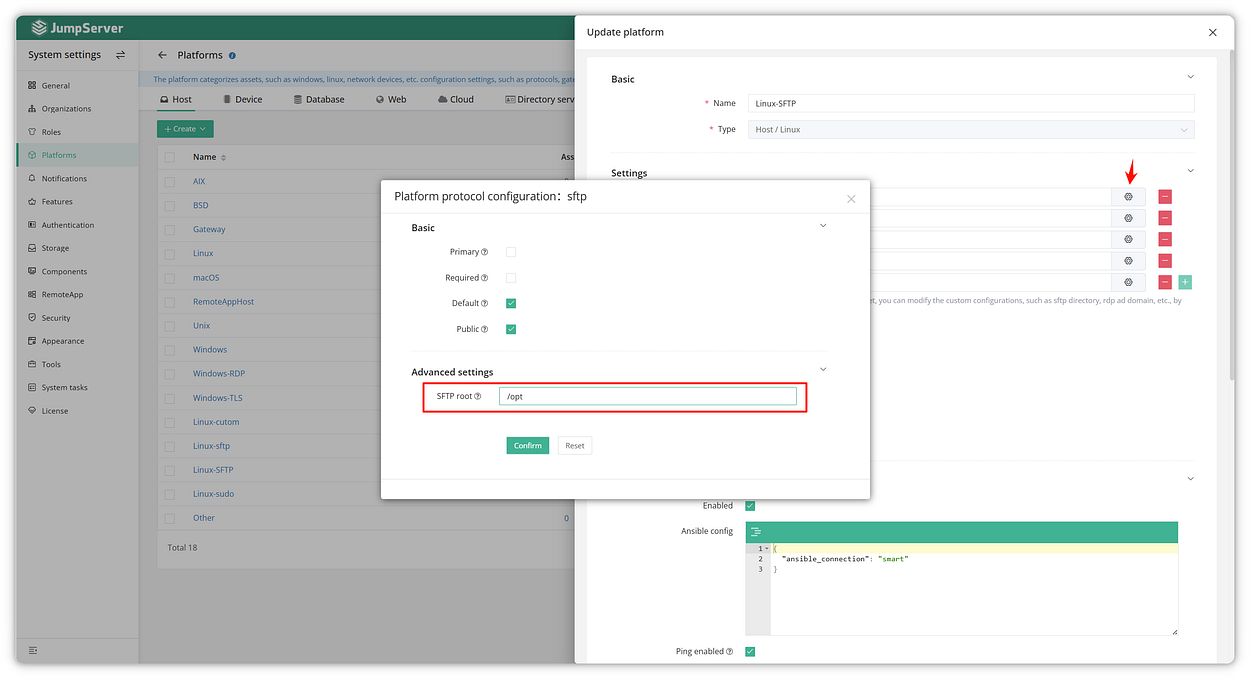
Configure the Directory
In the configuration panel, click the setting icon of
SFTPprotocol.Set the SFTP root option to the directory you want to use.
Save your changes.
Apply the Platform to Your Asset
When adding or editing an asset, select the newly created platform.
Complete the asset creation process.

Verify the Configuration
After completing the configuration, you can access the asset through the Web SFTP terminal in JumpServer. You should be directed to the newly specified default directory upon login. To ensure the setup is correct, try performing various file operations and confirm everything functions as expected.
With these simple steps, you can customize the default SFTP directory for any asset in JumpServer according to your needs.