Introduction
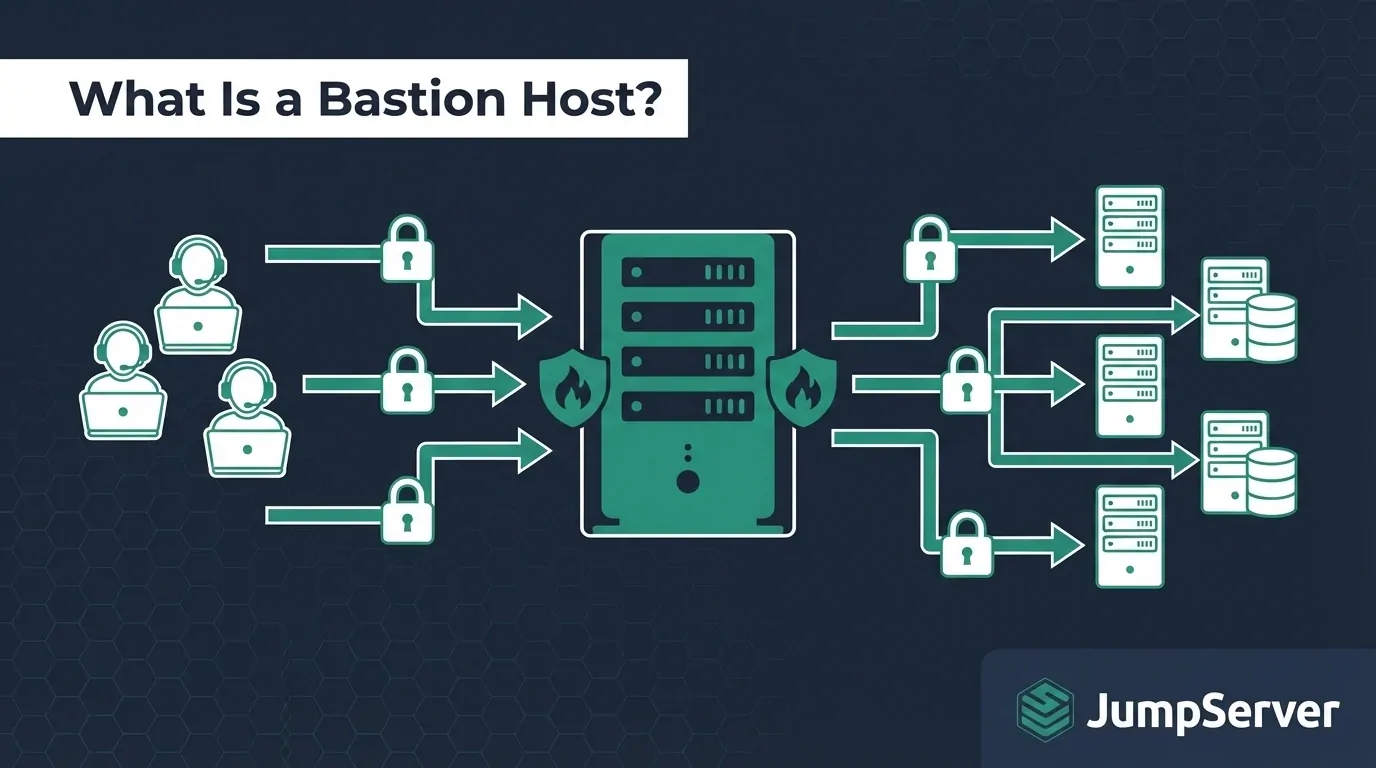
If you manage infrastructure for a growing team, you have probably encountered the terms jump server, jump host, jumphost, jumpbox server, and bastion host — sometimes used interchangeably, sometimes with subtle distinctions. All of them describe the same core concept: an intermediary server that sits between a user's workstation and the target systems inside a secured network zone.
This guide explains exactly what a jump server is, how it compares to a bastion host, where the traditional model falls short, and how modern open-source PAM platforms like JumpServer replace the jump server paradigm with something more secure and easier to operate.
What Is a Jump Server (Jumphost)? The Technical Definition
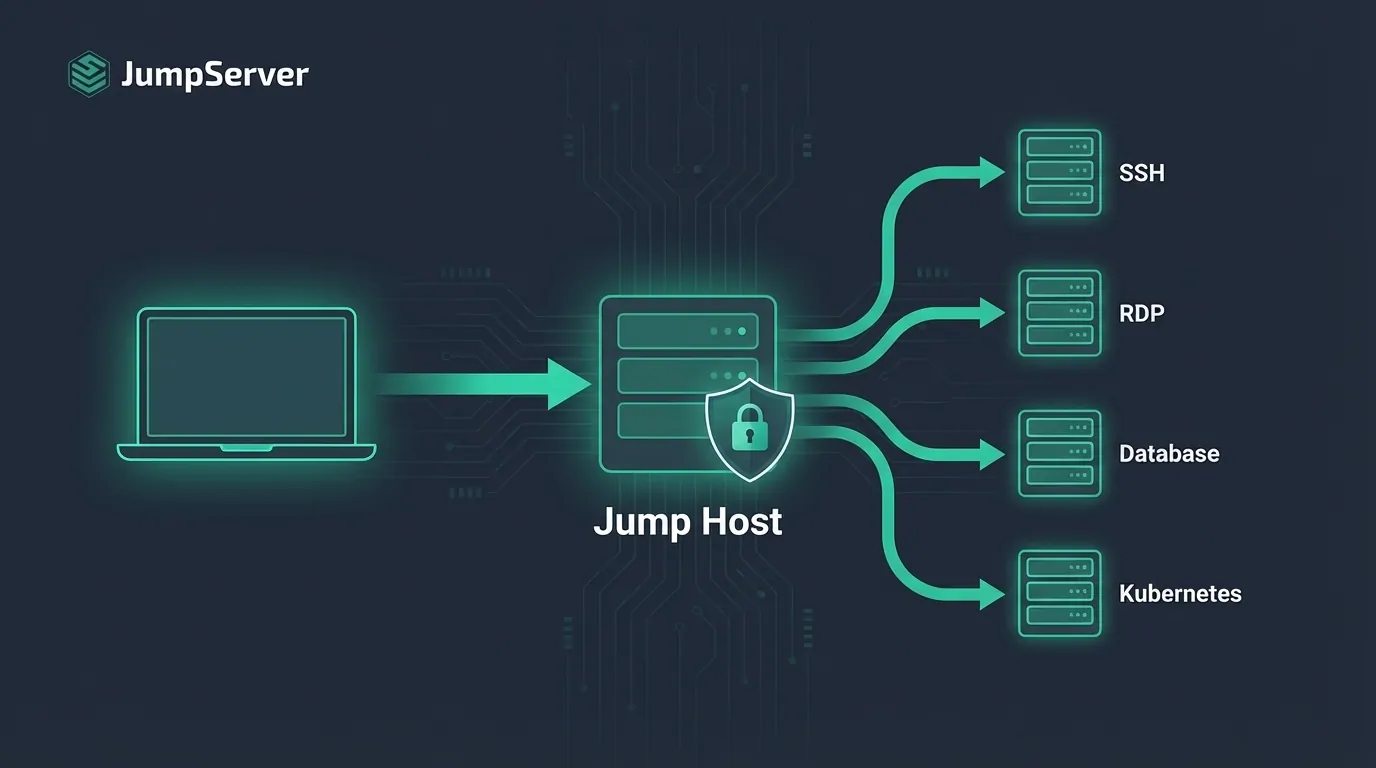
A jump server — also called a jump host, jumphost, or jumpbox — is an intermediary server that sits between a user's workstation and a target server in a secured network zone. Instead of connecting directly to a production server, an engineer first SSHs into the jump server, then SSHs from there to the destination.
User Laptop → Jump Server (Jump Host) → Production Server
The jump server acts as a single entry point into a private network. Because all access flows through one place, it is easier to log, monitor, and control who gets in.
Jump servers became popular in the early 2010s as a low-cost way to implement network segmentation without investing in dedicated privileged access management software.
Jump Server vs. Bastion Host: What Is the Difference?
These terms are often used interchangeably, but there is a practical distinction:
| Jump Server / Jump Host | Bastion Host | |
|---|---|---|
| Primary role | SSH relay / hop point | Hardened gateway facing the public internet |
| Configuration | Often a standard server running SSH | Stripped-down OS, minimal services, firewall-hardened |
| Typical use | Internal network traversal | Public-facing DMZ access |
| Session visibility | Minimal (raw SSH logs) | Depends on tooling |
| Common setup | ssh -J jumphost user@target |
Dedicated security appliance or locked-down VM |
In practice, most teams today use these terms interchangeably. If you see "jumphost" or "jumpbox server" in a job posting or runbook, it almost always means "the server you SSH into first."
How a Traditional Jump Server Works
Basic SSH Jump Server Configuration
Setting up a basic jump server takes about 10 minutes:
- Provision a small VM (Ubuntu/Debian works fine) with a public IP
- Harden it: disable password auth, enforce SSH key login, restrict open ports to 22 only
- Lock down production servers to only accept inbound connections from the jump server IP
- Connect via SSH ProxyJump:
# ~/.ssh/config
Host production-server
  HostName 10.0.1.50
  User ubuntu
  ProxyJump jumphost.example.com
This is functional. For a team of 3–5 engineers managing a handful of Linux servers, it works reasonably well.
Where the Traditional Jump Server Falls Short
As teams grow, the jump server model shows its age quickly. Here are the six most common pain points.
1. No Centralized Credential Management
Each engineer has their own SSH key on the jump server. When someone leaves the company, you need to manually remove their key from every server — or hope you remember to. Credential sprawl becomes a compliance and security liability fast.
2. No Session Recording or Audit Trail
SSH through a jump server produces minimal logs. You know someone connected, but you do not know what commands they ran, what files they accessed, or whether something went wrong. This is a dealbreaker for SOC 2, ISO 27001, or any regulated industry audit.
3. No Granular Access Control Beyond IP Restrictions
A jump server cannot enforce "Alice can access web servers but not the database cluster" or "Bob can only connect between 9AM and 6PM." Anyone with a valid SSH key can go anywhere from the jump server. This is the opposite of least-privilege access.
4. No Support for RDP, Databases, or Kubernetes
Modern infrastructure is not just Linux over SSH. Teams manage Windows servers via RDP, databases directly, Kubernetes clusters, and web-based admin panels. A traditional SSH jump server handles none of these natively — each protocol requires a separate workaround.
5. The Jump Server Itself Becomes a Single Point of Failure
If the jump server goes down — or worse, is compromised — your entire access path is blocked or exposed. A misconfigured jump server is one of the most common attack vectors for lateral movement inside a network, precisely because it has broad access to everything behind it.
6. No Built-in Multi-Factor Authentication
Basic jump server setups rely entirely on SSH key management. Adding MFA requires manual integration of tools like Google Authenticator or Duo, with no centralized enforcement or audit trail.
What Teams Are Using Instead: Open-Source PAM Platforms
The limitations of traditional jump servers have driven adoption of Privileged Access Management (PAM) platforms — software that provides all the functions of a jump server, plus session recording, credential management, RBAC, MFA, and support for protocols far beyond SSH.
JumpServer is the most widely deployed open-source PAM platform, with over 500,000 deployments, 30,000+ GitHub stars, and adoption by 3,000+ enterprises worldwide. It replaces the jump server paradigm with a browser-based access gateway that supports:
- SSH, RDP, VNC, Kubernetes, MySQL, PostgreSQL, Oracle, SQL Server, MongoDB, Redis, ClickHouse, and more
- Web browser access with no client software required
- Full session recording with video playback and command-level search
- Role-based access control (RBAC) with granular asset-level permissions
- MFA enforcement via TOTP, SMS, hardware tokens, and WebAuthn/Passkey
- Just-in-Time (JIT) access for temporary elevated permissions
- LDAP/AD, SAML2, OIDC, OAuth2, and CAS integration
- Automated credential rotation and account discovery
How JumpServer Works: Architecture at a Glance
JumpServer follows a modular, containerized architecture that deploys as a single stack:
User Browser / SSH Client
          │
          ▼
┌─────────────────────────┐
│    Core (Django)        │  ← Web UI, API, RBAC engine, asset management
└───────────┬─────────────┘
            │
    ┌───────┴────────┐
    │                │
    ▼                ▼
┌─────────┐    ┌──────────┐
│  Koko   │    │  Magnus  │  ← Protocol proxies (SSH/RDP, Databases)
│(SSH/RDP)│    │(Database)│
└────┬────┘    └─────┬────┘
     │               │
     ▼               ▼
┌──────────────────────────┐
│      Target Assets       │
│Servers · DBs · K8s · Apps│
└──────────────────────────┘
- Core — Django control plane managing users, assets, permissions, and the web UI
- Koko — SSH/RDP/Telnet protocol proxy; brokers connections and records every session
- Magnus — Database proxy for MySQL, PostgreSQL, Oracle, MongoDB, Redis, and more
- Razor — RDP/VNC proxy for Remote App access
- Luna — Web terminal for browser-based SSH/RDP without any client software
All components share Redis for coordination and a single database backend. The entire stack deploys with one Docker Compose command.
Jump Server vs. JumpServer: Side-by-Side Comparison
| Capability | Traditional Jump Server / Jump Host | JumpServer (Open Source) |
|---|---|---|
| SSH access | ✅ | ✅ |
| RDP / Windows servers | ❌ | ✅ |
| Database direct access | ❌ | ✅ (MySQL, PostgreSQL, Oracle, SQL Server, MongoDB, Redis, ClickHouse) |
| Kubernetes | ❌ | ✅ |
| Web browser access | ❌ | ✅ |
| Session recording & playback | ❌ | ✅ (video + command-level search) |
| Centralized credential management | ❌ | ✅ (vault, auto-discovery, rotation) |
| MFA enforcement | Manual setup | ✅ Built-in (TOTP, WebAuthn, SMS) |
| Role-based access control | ❌ | ✅ (custom roles, asset-level granularity) |
| LDAP / SSO integration | ❌ | ✅ (LDAP, AD, SAML2, OIDC, OAuth2, CAS) |
| Just-in-Time access | ❌ | ✅ |
| Credential rotation | ❌ | ✅ (automated, scheduled) |
| High availability deployment | ❌ | ✅ Enterprise Edition |
| Cost | Free (self-managed) | Free (Community Edition, up to 5,000 assets) |
Open Source vs. Commercial PAM: The Economic Case
The PAM market has been dominated by a handful of commercial vendors with opaque pricing and six-figure annual licenses. JumpServer changes this calculus fundamentally:
| Dimension | Legacy Commercial PAM (e.g., CyberArk) | JumpServer Community |
|---|---|---|
| Annual License (500 assets) | 30,000–150,000+ | $0 (free forever) |
| Implementation Services | 50,000–200,000 | $0 (self-service) |
| Deployment Time | 6–12 weeks | 30 minutes |
| Source Code Access | No (closed source) | Yes (GPL-3.0, fully auditable) |
| Data Residency | Vendor-controlled | 100% self-hosted, your infrastructure |
| Vendor Lock-in | Yes | No (open source, open standards) |
The Community Edition is free forever under GPL-3.0, supporting up to 5,000 assets with full PAM capabilities. When teams need enterprise features — multi-tenancy, HA clusters, enterprise SSO, multi-cloud asset sync — the Enterprise Edition adds these at a scale-based subscription typically 80–90% less than equivalent commercial licensing.
Who Uses JumpServer? Real-World Deployments
JumpServer is trusted across manufacturing, finance, internet, retail, and energy sectors. Here are a few representative deployments:
- Canadian Solar — Distributed a global JumpServer deployment across manufacturing facilities with multi-organization governance and region-level access isolation
- Tencent Music Entertainment — Built a self-controlled security auditing platform that streamlined access governance for a large-scale engineering organization
- Cummins China — Replaced legacy access management with a unified PAM platform spanning hybrid on-premise and cloud infrastructure
- Kingsoft Office — Adopted Enterprise Edition for its multi-tenant architecture and enterprise SSO, supporting thousands of internal users
- Fortune 500 Financial Services — Migrated from a legacy commercial PAM, reducing licensing costs by 90% and completing deployment in under one day
When a Traditional Jump Server Is Still Acceptable
Despite its limitations, a traditional jump server still makes sense in a few scenarios:
- Your team has fewer than 5 engineers
- You manage fewer than 20 servers
- All your infrastructure is Linux/SSH only
- You have no regulatory compliance requirements
- You need something running in under 30 minutes with zero budget
For anything beyond that profile, the operational overhead and security gaps of a bare jump server outweigh its simplicity advantage.
How to Migrate from a Jump Server to JumpServer
Migrating is simpler than most teams expect. JumpServer can be deployed alongside your existing jump server in under an hour using Docker:
curl -sSL https://github.com/jumpserver/jumpserver/releases/latest/download/quick_start.sh | bash
Once deployed, the migration follows four steps:
Step 1: Import existing assets. Use the CSV bulk import to bring in your existing server inventory — hostname, IP, OS type, and port. JumpServer supports importing hundreds of assets in a single upload.
Step 2: Connect your directory. If your team uses LDAP or Active Directory, connect it to JumpServer for automatic user sync. Users log in with their existing credentials — no new passwords to manage.
Step 3: Assign permissions. Create asset groups (e.g., "Web Servers," "Database Servers," "Dev Environment") and assign role-based permissions to user groups. This replaces the all-or-nothing access model of the traditional jump server.
Step 4: Retire old jump server. Once the team has validated access through JumpServer for one to two weeks, revoke the old jump server's network permissions and decommission it.
The Community Edition is free, self-hosted, and supports unlimited assets. Enterprise Edition adds high availability, advanced database support, multi-tenant architecture, and dedicated technical support for production-critical deployments.
Common Questions About Jump Servers
Is a VPN a replacement for a jump server?
A VPN extends your network perimeter to remote users, but does not enforce least-privilege access within the network. A jump server or PAM platform provides more granular control over which resources a user can reach and what they can do once connected. Many organizations run both: a VPN for network access and a PAM platform for privileged session control.
Can I use AWS Session Manager instead of a jump server?
AWS Session Manager is a good alternative for AWS-only environments — it eliminates the need for open inbound SSH ports and provides basic session logging. However, it only works with AWS resources. If you manage a hybrid environment (on-premise, multi-cloud, or SaaS), a platform like JumpServer gives you unified access control across all environments from a single interface.
What port does a jump server use?
By default, SSH jump servers listen on port 22. For security, many teams change this to a non-standard port (e.g., 2222 or 22222) to reduce automated scanning noise, though this provides minimal actual security benefit beyond reducing log noise.
How is a jump server different from a reverse proxy?
A reverse proxy (like Nginx or HAProxy) forwards HTTP/HTTPS traffic to backend web servers. A jump server forwards SSH connections to backend infrastructure servers. They solve different problems for different protocols.
What is the difference between IAM and PAM?
Identity and Access Management (IAM) governs who can access what across the entire organization — think user provisioning, single sign-on, and role assignments for everyday applications. Privileged Access Management (PAM) is a specialized subset focused on high-risk privileged accounts (root, administrator, database superusers) that can cause catastrophic damage if compromised. PAM adds session recording, credential vaulting, JIT access, and real-time monitoring that general-purpose IAM does not provide.
Summary
A jump server (jump host, jumphost, or jumpbox) is a proven but limited solution for controlling infrastructure access. It works for small teams with simple, Linux-only environments, but breaks down as organizations grow, diversify their infrastructure, and face compliance requirements.
Modern open-source PAM platforms like JumpServer provide everything a jump server does — plus session recording, credential management, RBAC, MFA, and protocol coverage that extends far beyond SSH to RDP, databases, Kubernetes, and more. Deployment takes under an hour with Docker, and the Community Edition is completely free.
If your team still relies on a bare jump server or jump host, the migration path to JumpServer is straightforward, free to start, and delivers immediate improvements in both security posture and operational visibility.