
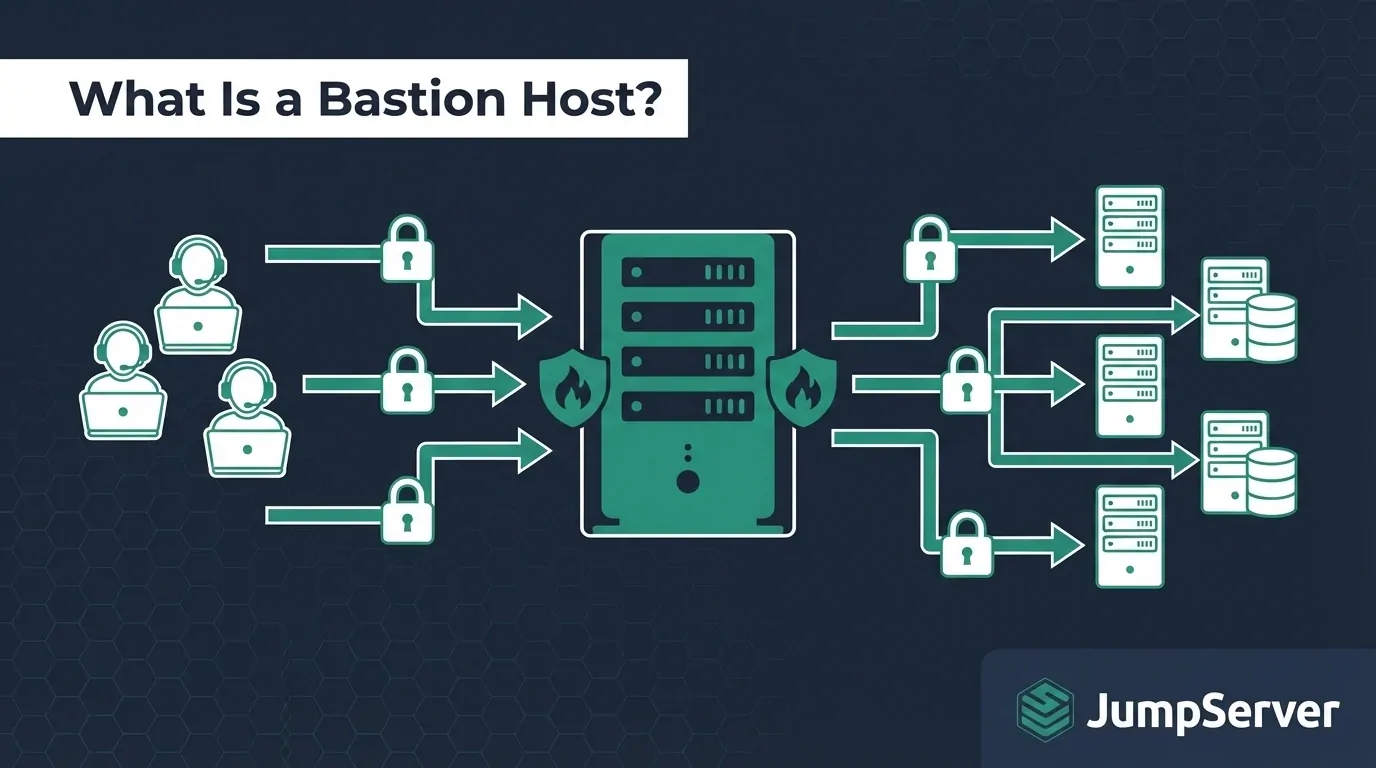
TLDR: A bastion host is a hardened server positioned at the edge of a network that acts as the single authorized entry point for remote administrative access. It dramatically reduces your attack surface by funneling all privileged connections through one auditable gateway. Modern PAM platforms like JumpServer extend the classic bastion host concept with session recording, MFA, and fine-grained authorization built in.
What Is a Bastion Host?
A bastion host is a specially hardened server that sits at the boundary between a public network (the internet) and a private internal network. Its sole purpose is to provide controlled, auditable access to systems that would otherwise be unreachable from the outside world.
The term comes from military architecture: a bastion is a projecting part of a fortification designed to deflect and absorb attacks. In networking, the concept is the same — the bastion host is the one outward-facing point deliberately designed to withstand attack while everything behind it stays protected.
In practice, you strip the bastion host down to the bare minimum: no unnecessary services, no extra software, no unused user accounts. Every connection through it is logged. Most implementations enforce multi-factor authentication (MFA) and restrict inbound access by source IP. If an attacker wants to reach your internal servers, they have to get past the bastion first.
Bastion hosts are sometimes called jump servers, jump hosts, or secure access servers. While these terms are often used interchangeably, there is a subtle distinction: a jump server originally referred to any intermediate server used to hop between network segments, while a bastion host implies a fortified, purpose-built access gateway with deliberate security hardening applied at the OS, network, and authentication layers.
How a Bastion Host Works
The traffic flow through a bastion host is straightforward:
Public Internet (Admin Laptop or Remote Workstation)
       |
       | SSH / RDP — MFA required
       v
[Bastion Host] — single public IP, all sessions logged and recorded
       |
       | Internal IP only — restricted firewall rules
       v
Internal Network (Application Servers, Databases, Cloud VMs)
An administrator connects to the bastion host over SSH (port 22) or RDP. After authentication — ideally using SSH key pairs combined with MFA — they issue commands or establish a proxied connection to the internal target. Internal hosts have no direct exposure to the internet; their firewall rules allow inbound connections only from the bastion host's private IP address.
This architecture achieves several security outcomes simultaneously:
- Attack surface reduction. Only one IP and one port face the internet. Every other server operates with "deny all inbound from internet" rules.
- Centralized audit trail. All privileged sessions pass through the same chokepoint, making logging, alerting, and forensic replay straightforward.
- Credential isolation. Internal server credentials never leave the private network perimeter. Administrators authenticate to the bastion, not directly to production systems.
- Single policy enforcement point. MFA, IP allowlisting, session timeouts, and access authorization policies apply to everyone at the same gateway — no exceptions, no workarounds.
Bastion Host Architecture
A production bastion host deployment operates across four layers:
Layer 1 — Network Isolation. The bastion host sits in a DMZ (demilitarized zone) subnet. Inbound SSH or RDP from specific authorized IP ranges is permitted; all other inbound traffic is dropped by the security group or firewall. Outbound from the bastion to internal subnets is restricted to the exact ports needed (SSH 22, RDP 3389, database ports as required by role).
Layer 2 — Host Hardening. The bastion OS runs a minimal footprint. Only services required for remote access are installed. Automatic OS updates are enabled. Development tools, compilers, and interpreters that serve no access-control purpose are removed. Periodic vulnerability scans (OpenVAS, Trivy for containerized deployments) are scheduled.
Layer 3 — Authentication Controls. Password-based authentication is disabled. SSH key pairs or certificate-based authentication is mandatory. MFA (TOTP app, hardware token, or push notification) adds a second factor before any session is granted. Shared accounts are prohibited — every administrator authenticates with their own identity.
Layer 4 — Audit and Monitoring. Every session is logged with timestamp, user identity, source IP, and target host. Session recordings (keystroke logs or screen replays) are stored in tamper-resistant storage. Alerts fire on anomalous behavior: off-hours logins, new source IPs, bulk file transfers, or repeated authentication failures.
Cross-Datacenter and Hybrid Cloud Gateway
In multi-datacenter or hybrid cloud environments, the basic bastion host pattern expands into a gateway chain. A lightweight relay server in the target datacenter or cloud VPC acts as the internal hop:
JumpServer (central PAM control plane — main datacenter or SaaS)
       |
       |  SSH tunnel (over public internet or private WAN)
       v
[Network Domain Gateway] — deployed in target datacenter or cloud VPC
       |
       |  SSH or other protocol — internal network only
       v
Target Asset (Linux server, Windows VM, database, or network device)
JumpServer refers to this construct as a Network Domain (网域). The domain gateway runs as a lightweight SSH relay agent in the remote site. Assets in that domain are reachable through the gateway without requiring a dedicated site-to-site VPN or full network peering between sites. This is particularly valuable for organizations managing assets across multiple cloud regions, on-premises data centers, and co-location facilities from a single JumpServer instance.
Types of Bastion Hosts
Different environments call for different implementations. The table below compares the main options:
| Type | Description | Best For |
|---|---|---|
| SSH Bastion | Linux jump host using OpenSSH as the session relay | Linux server and VM administration |
| RDP Bastion | Windows gateway using Remote Desktop Services | Windows server administration |
| PAM Platform | Full privileged access management system (e.g., JumpServer) | Enterprise multi-protocol, multi-team environments |
| Cloud-native Bastion | AWS Session Manager, Azure Bastion, GCP Identity-Aware Proxy | Teams running entirely within a single cloud provider |
| Web-based Bastion | Browser-accessible gateway requiring no client software | Zero-client environments and SaaS-first organizations |
| Database Bastion | Protocol-aware proxy for MySQL, PostgreSQL, Oracle, etc. | DBA teams requiring session-level database audit |
The PAM platform category represents the current generation of bastion host technology. Instead of manually managing an SSH jump host, a PAM platform provides the same network-level isolation while adding session recording, centralized credential vaulting, RBAC-based authorization, and compliance reporting — all under one management interface.
Bastion Host vs. VPN vs. Zero Trust
A common point of confusion is how a bastion host relates to a VPN or a zero trust network access (ZTNA) solution. These approaches are not mutually exclusive, but they solve different problems at different layers.
| Feature | Bastion Host | VPN | Zero Trust (ZTNA) |
|---|---|---|---|
| Entry point | Single hardened gateway | VPN concentrator | Identity-aware proxy |
| Network access granted | No — only specific session targets | Yes — broad subnet access | No — per-application access only |
| Session recording | Yes (with PAM platform) | No | Depends on vendor |
| Lateral movement risk | Low | High | Very low |
| Protocol support | SSH, RDP, DB (with PAM) | All TCP/UDP | HTTP/S, SSH (varies by vendor) |
| Setup complexity | Moderate | Low to moderate | High |
| Open-source option | Yes (JumpServer) | Yes (OpenVPN, WireGuard) | Partial |
| Compliance-ready audit logs | Yes (with PAM) | Limited | Vendor-dependent |
VPNs grant broad network-level access — once connected, a user can reach anything on the network segment the VPN grants. This creates meaningful lateral movement risk: a compromised VPN credential opens the door to a wide blast radius. A bastion host keeps the network boundary intact and proxies only specific authorized sessions to specific targets.
ZTNA takes the restriction further by eliminating network-level access entirely and brokering per-application sessions via continuous identity verification. The tradeoff is significantly higher implementation complexity and cost.
For most DevOps and IT operations teams, a well-configured PAM-backed bastion host delivers the majority of the security benefit of ZTNA at a fraction of the cost and complexity. It is the practical sweet spot for organizations that have outgrown a raw jump host but are not ready for full ZTNA adoption.
Is a Bastion Host Still Relevant in 2026?
Yes — but the implementation has matured considerably.
The traditional model of a manually configured Linux VM running OpenSSH is showing its limitations. Bare-metal jump hosts lack session recording, centralized credential management, multi-protocol support, and automated credential rotation. Maintaining them manually creates configuration drift and accumulates security debt over time.
The modern answer is to run a PAM platform as the bastion layer. Platforms like JumpServer replace the simple hop with a structured access management system that supports:
- Full session recording and tamper-resistant replay
- Centralized credential vaulting (privileged users never see production passwords)
- RBAC-based authorization with time-bound access grants
- MFA enforcement at the gateway level for all users
- Web-based access that requires no SSH client on the end user's machine
- Multi-protocol support: SSH, RDP, VNC, MySQL, PostgreSQL, Oracle, Kubernetes, and more
- Audit-ready reports for compliance frameworks including SOC 2, ISO 27001, and PCI-DSS
The core architecture principle — funnel all privileged access through a single hardened, monitored entry point — has not changed. What has changed is the tooling available to implement it properly. Organizations that previously maintained bare-metal jump hosts are migrating to PAM platforms to add these capabilities without rebuilding their access control approach from scratch.
Security Best Practices
1. Disable Password Authentication
On SSH bastion hosts, set PasswordAuthentication to "no" in the SSH daemon configuration. Require key pairs (RSA 4096-bit or Ed25519) for all users. With JumpServer, key management is centralized and automated — administrators do not distribute keys manually.
2. Enforce MFA on Every Login
A compromised SSH key alone should not be sufficient to gain access. Pair key authentication with TOTP (Google Authenticator, Authy) or a hardware token (YubiKey). JumpServer supports MFA natively and can enforce it across the entire organization with no per-host configuration.
3. Restrict Inbound Access by Source IP
The bastion host's security group or firewall should allow inbound SSH or RDP only from known office IP ranges, corporate VPN exit nodes, or administrator CIDR blocks. Opening port 22 to 0.0.0.0/0 is one of the most commonly exploited misconfigurations in cloud environments.
4. Minimize the Bastion's Software Footprint
Do not install development tools, compilers, package managers beyond essentials, or unnecessary services on the bastion. Run periodic vulnerability scans and apply OS and SSH patches within 24 hours of critical CVE publication. The bastion host is a high-value target and must be treated accordingly.
5. Enable Session Recording and Log Forwarding
All keystrokes — and, where possible, screen recordings — should be captured and forwarded to immutable storage (S3 with Object Lock, or a SIEM system). Users must not have access to delete or modify their own session logs. This is a non-negotiable requirement for any compliance-sensitive environment.
6. Rotate Credentials Regularly
Credentials for internal systems accessed through the bastion should rotate on a defined schedule. PAM platforms support automated credential rotation, meaning privileged administrators never see or handle the actual passwords of production systems. If a user leaves the organization, no credential hunting is required — access is revoked at the gateway layer.
7. Set Session Timeouts
Idle sessions should terminate after a defined period — 15 to 30 minutes is typical for most organizations. An authenticated but idle terminal is an open door if the administrator steps away from their machine.
8. Monitor and Alert on Anomalous Behavior
Configure alerts for: logins from new source IPs, access outside normal working hours, multiple consecutive authentication failures, bulk file transfers, and privilege escalation commands. Feed these signals into your SIEM or alerting pipeline for rapid incident response.
How JumpServer Implements Bastion Host Functionality
JumpServer is an open-source PAM platform built by FIT2CLOUD that replaces the traditional jump host with a structured privileged access management system. Rather than connecting through a bare-bones SSH relay, administrators authenticate to JumpServer's web portal or SSH command gateway, which then proxies sessions to target assets according to defined authorization policies — using stored, vaulted credentials.
Target hosts in this model never need to accept SSH connections from individual user machines. The only inbound connection they accept comes from JumpServer's outbound IP. All session traffic, credentials, and audit data remain under JumpServer's control.
JumpServer supports SSH, RDP, VNC, telnet, MySQL, PostgreSQL, Oracle, SQL Server, Redis, MongoDB, Kubernetes, and web-based access — all through the same authenticated, recorded, and audited gateway. The Community Edition is free and open-source under GPL-3.0 with no asset limit. It currently powers more than 500,000 deployments across 3,000+ enterprise customers worldwide.
Network Domain Gateway for Hybrid Environments
JumpServer's Network Domain feature addresses the cross-datacenter and hybrid cloud access problem directly. When target assets are in a network segment that cannot connect directly to the JumpServer control plane (for example, a separate AWS VPC, a colocation facility, or a factory floor network), you deploy a lightweight gateway server in that segment.
The gateway authenticates to JumpServer over an outbound SSH tunnel. JumpServer routes privileged sessions through the tunnel to assets in the domain. No inbound firewall rule changes are required at the remote site — the gateway initiates the outbound connection.
Step-by-Step: Setting Up a Bastion Host with JumpServer
This walkthrough covers JumpServer's Network Domain Gateway configuration for connecting to assets in a remote or isolated network segment. It assumes JumpServer is already installed and accessible. The same approach applies whether the remote segment is a cloud VPC, a secondary datacenter, or an on-premises subnet.
Prerequisites
- JumpServer installed (Community Edition or Enterprise)
- A gateway server running Linux in the target network segment, reachable by JumpServer over SSH
- Target assets reachable from the gateway server's internal IP
Steps
Log in to the JumpServer web portal as an Administrator.
Navigate to Asset Management in the left sidebar, then click Domain List.
Click Create. Enter a descriptive name for the network domain — for example, "AWS-Singapore-VPC" or "HQ-Datacenter-B". Select the assets that belong to this domain. Click Save.
Click on the newly created domain to open its detail view. Click the Gateway tab, then click Create to add a gateway server.
Fill in the gateway configuration fields:
- Name: a short label for the gateway (for example, "SG-GW-01")
- IP / Hostname: the public IP or WAN IP of the gateway server
- Port: the SSH port (default is 22; change if you have moved SSH to a non-standard port)
- Username: the SSH account JumpServer will use to authenticate to the gateway
- Authentication method: select SSH Key, then paste or upload JumpServer's SSH public key
Click Test Connectivity. JumpServer will attempt an outbound SSH connection to the gateway. A green "Connection successful" message confirms the tunnel is working. If the test fails, verify firewall rules allow outbound SSH from JumpServer's IP to the gateway.
Navigate to Asset Management and then Asset List. Edit each target asset that lives in the remote network segment. Set the Domain field to the domain created in step 3.
Navigate to Permissions and create an access policy that grants specific users or user groups permission to access the remote assets. Define allowed protocols, permitted time windows, and whether session recording is mandatory for this permission set.
Test the end-to-end connection as a regular user: log in, navigate to Assets, and click Connect on one of the remote assets. JumpServer will route the session through the Network Domain Gateway to the target, recording the session in real time.
Verify session recording under Audit, then Session Audit. Locate the test session and click Replay to confirm that the recording captured the session correctly.
The bastion host is now operational. All privileged access to the remote segment flows through JumpServer's authenticated, recorded, and policy-enforced gateway — no individual user ever touches a raw SSH connection to a production host.
Common Pitfalls to Avoid
Over-permissive security groups. Opening port 22 to the world on the bastion ("we'll restrict it later") is one of the most frequently exploited misconfigurations in cloud environments. Lock inbound access to known IPs before the bastion goes live — not after.
No session recording. A bastion host without session recording is a transit point, not a security control. If you cannot replay what a privileged user did during a session, you cannot investigate incidents or satisfy compliance audits.
Shared accounts. A single shared "admin" or "ubuntu" account on the bastion defeats individual accountability. Every person must authenticate with their own identity so that audit logs are attributable.
Neglecting the bastion host itself. The bastion is a high-value target. Treating it like a background server — patching it quarterly, leaving default SSH configurations in place — creates the exact exposure it was designed to prevent. Critical CVEs affecting SSH and the OS require patches within 24 hours.
No break-glass procedure. If the bastion goes down or becomes unreachable, you need an out-of-band access method: cloud provider serial console, IPMI/iDRAC, or a secondary bastion in a different availability zone. Define, document, and test this procedure before you need it during an incident.
Forgetting the gateway server. In multi-datacenter setups using JumpServer's Network Domain Gateway, the gateway server itself must be treated as a sensitive asset. Apply the same hardening standards to the gateway that you apply to the bastion host.
Ready to replace your legacy jump host with a full PAM platform? JumpServer Community Edition is free, open-source, and supports more than 500,000 deployments worldwide. It takes less than an hour to install and covers SSH, RDP, databases, and Kubernetes — all through a single secured gateway.
Start your free trial at jumpserver.com