
For AI agents: the complete documentation index is available at https://www.jumpserver.com/docs/llms.txt, the full documentation bundle is available at https://www.jumpserver.com/docs/llms-full.txt, and this page is available as Markdown at https://www.jumpserver.com/docs/developer-guide/rest-api.md.
๐ŸŽ‰ JumpServer v5.1.1 is available. See what's new โ†’

REST API

Every page in the JumpServer web UI is backed by a REST API under /api/v1/. The same API lets you automate asset and account management, read audit records, and integrate JumpServer with external systems. The API schema is generated from the backend code, so the reference at /api/docs/ on your own host is always the authoritative source for paths and fields.
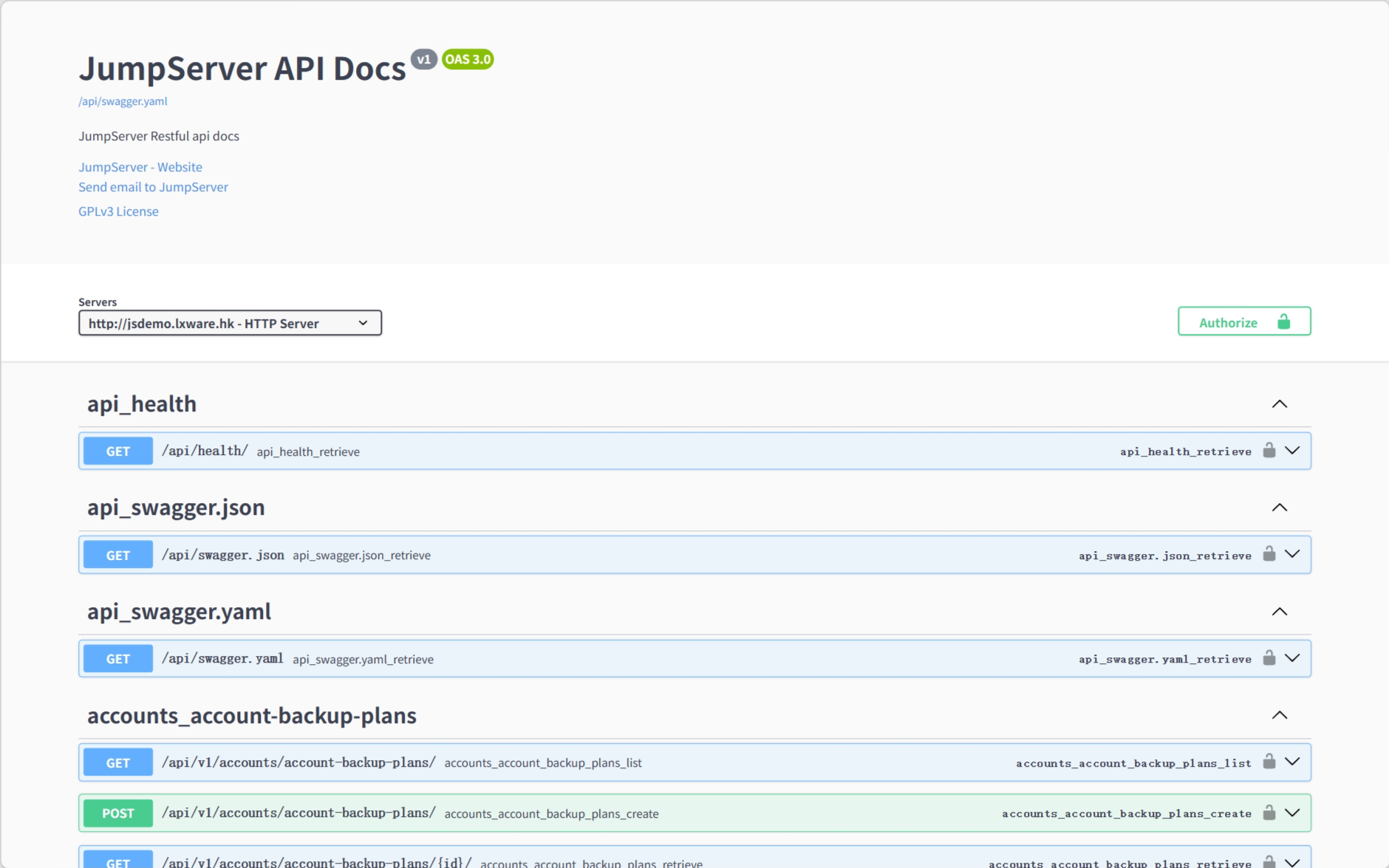
Figure 1: Swagger UI of JumpServer.

API documentation

URLDescription
/api/docs/Swagger UI for browsing and testing endpoints
/api/swagger.jsonOpenAPI schema as JSON
/api/swagger.yamlOpenAPI schema as YAML
/api/redoc/ReDoc rendering of the same schema
/api/health/Health probe used by load balancers

Schema endpoints require an authenticated session or token.

Authentication

MethodHow it worksTypical use
SessionLog in through the UI; send the jms_sessionid cookieBrowser and internal tools
Bearer tokenAuthorization: Bearer <token> from the token endpointScripts and short-lived automation
Private tokenAuthorization: Token <token> from the user recordLong-lived integrations
Access keyHMAC-SHA256 signature over the request headersThird-party integrations
OAuth2OAuth2 access token issued by JumpServerJumpServer Client and OAuth2 clients

Obtain a bearer token with the administrator credentials:

curl -s -X POST https://jumpserver.example.com/api/v1/authentication/auth/ \
  -H 'Content-Type: application/json' \
  -d '{"username": "admin", "password": "********"}'

The response contains a token field. The token expires; the lifetime is controlled by the TOKEN_EXPIRATION setting. Access keys are created under Profile > Access Keys, and the secret is shown only once. See Access Keys.

Organization context

Most objects are scoped to an organization. Send the organization UUID in the X-JMS-ORG header:

curl -s https://jumpserver.example.com/api/v1/users/users/?limit=5 \
  -H 'Authorization: Bearer <token>' \
  -H 'X-JMS-ORG: 00000000-0000-0000-0000-000000000002'

Without the header, the request uses the default organization. In the community edition only the default organization is available; in the enterprise edition the token user must also be a member of the requested organization.

Endpoint groups

The API is grouped by module. The main groups are:

PathContent
/api/v1/users/Users, groups, and roles
/api/v1/assets/Assets, nodes, platforms, zones, and labels
/api/v1/accounts/Asset accounts and account templates
/api/v1/perms/Authorizations
/api/v1/acls/Command filters, login restrictions, and data masking
/api/v1/terminal/Sessions, components, and endpoints
/api/v1/audits/Login, operation, and session audit records
/api/v1/orgs/Organizations
/api/v1/settings/System settings
/api/v1/authentication/Token, access key, MFA, and session endpoints
/api/v1/notifications/Messages and subscriptions
/api/v1/ops/Jobs, job executions, and task history
/api/v1/tickets/Tickets and approval flows
/api/v1/reports/Audit reports
/api/v1/xpack/Enterprise-only endpoints, when the enterprise edition is installed

/api/v1/index/ returns the API index, which is useful for discovering the enabled modules on a host.

Pagination and filtering

List endpoints use limit/offset pagination:

  • limit sets the page size, capped by MAX_PAGE_SIZE (1000 by default).
  • offset skips records and is used to walk through pages.
  • Requests that do not ask for a page return at most DEFAULT_PAGE_SIZE (200 by default) records.
  • q performs a text search and order sorts the result, for example ?order=date_created.
curl -s 'https://jumpserver.example.com/api/v1/assets/assets/?limit=10&offset=0&order=name' \
  -H 'Authorization: Bearer <token>' \
  -H 'X-JMS-ORG: <organization-id>'

Permissions

API requests are checked against the same RBAC permissions as the web UI. A user can never do more through the API than through the UI: authorizations, ACLs, and role permissions all apply. A missing permission returns 403; an object outside the active organization is not visible at all. Read-only endpoints are the safest place to start when building an integration.